better-tasks
🌀 Better Tasks for Roam Research
The missing task layer for Roam
Turn native TODOs into scheduled and recurring tasks with inline pills, a powerful dashboard, and optional Today widget/badge — all stored as plain Roam blocks.
✅ Roam-native storage (child blocks) • ✅ Recurring + one-off scheduled tasks • ✅ Subtasks & dependencies • ✅ Actively maintained
Support / bugs: Please message me in the Roam Slack (include repro steps + any console output if relevant):
https://app.slack.com/client/TNEAEL9QW/
What it looks like (start here)
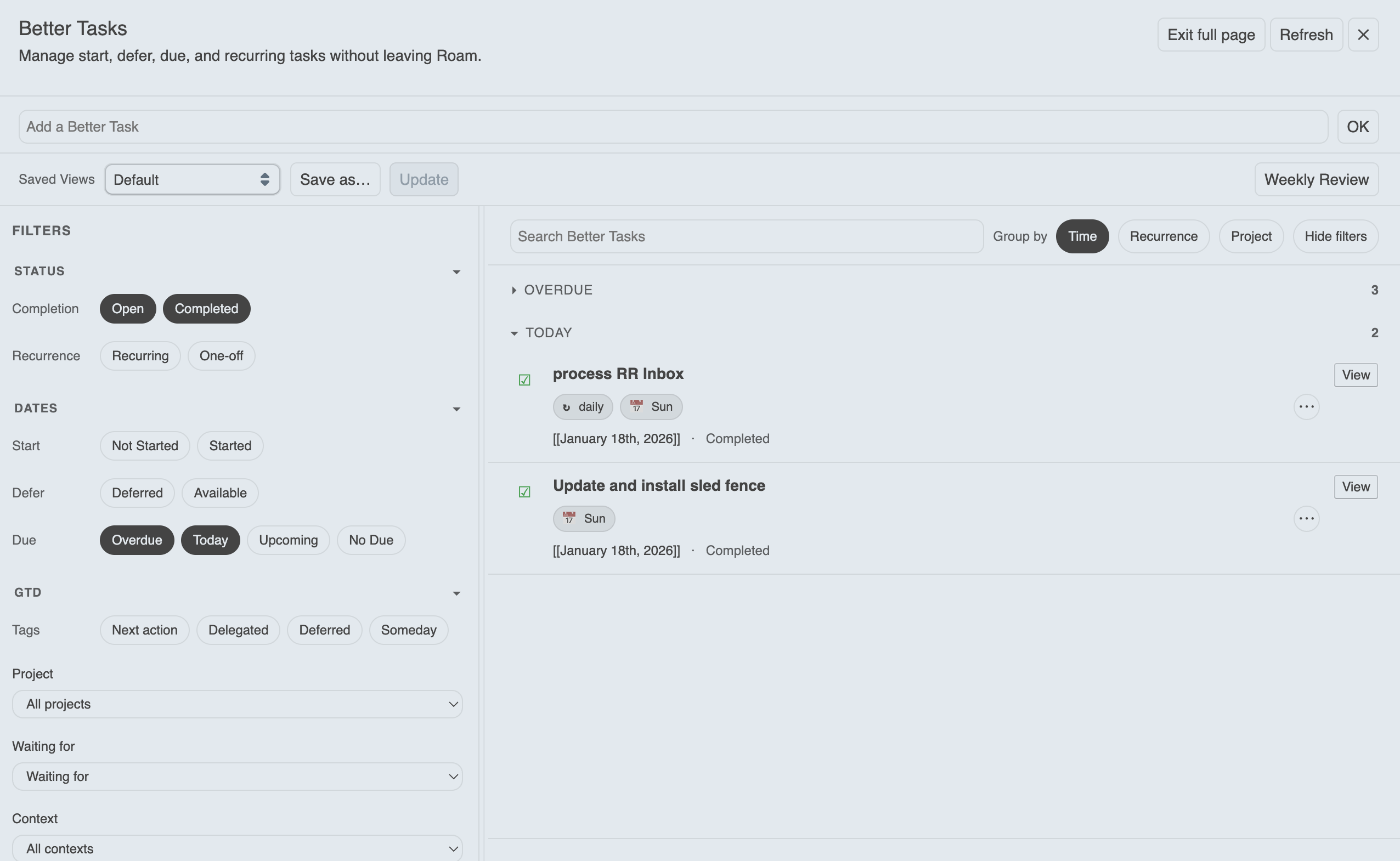
Why Better Tasks
If you use TODOs in Roam, Better Tasks gives you:
- Recurring tasks that spawn the next occurrence when completed
- Start / Defer / Due dates for scheduled one-off tasks
- Inline pills for fast editing, snoozing, and jumping to DNPs
- A dashboard for review & triage, saved views, and weekly review presets
- Bulk operations to complete, snooze, or update metadata across multiple tasks
- Optional Today widget (on today’s DNP) and Today badge (left sidebar)
- Subtasks with progress indicators, structural nesting or explicit cross-graph linking
- Task templates with parameterised titles, metadata defaults, and subtask structures
- Focus / Do Mode — distraction-free single-task execution surface with keyboard-first navigation
- Optional metadata: Project, Context, Waiting-for, GTD, Priority, Energy, Dependencies
✅ Recent updates
- Roam query integration: Better Tasks now lives inside Roam’s own query surfaces. Type
in any block and it becomes a live task list — real Roam blocks with working checkboxes, clickable refs and inline pills, plus a result count and refresh button (filters: `status`, `project`, `due`, `completed`, `blocked`, `assignee`, `query`, `limit`, `sort`). Project, waiting-for and context values are now written as `[[page links]]`, so nativeblocks and Datalog find your tasks with no extension involvement — and each value gets a real page with linked references. Inline pills also render on every copy of a task now, including native query results, ``s and linked references, not just the first one on the page. Full guide with copy-paste Datalog snippets: docs/query-cookbook.md. Existing tasks are untouched; re-save an attribute to upgrade it, or turn page links off in settings. - Smart Suggestions: advisory nudges computed locally from your task history — never automatic, every change needs an explicit Accept. Five rules: a task snoozed 5+ times suggests Someday / Maybe; a recurring series usually completed on a different weekday than scheduled suggests rescheduling; an overloaded day next week with an empty day nearby suggests moving a flexible task; a stalled task with no near-term due date suggests Someday / Maybe; a chronically-late recurring series suggests reviewing its repeat rule. Slide-in panel from the dashboard header (Suggestions button with live count badge) or
Shift+I. Dismissals persist with a 30-day cooldown. Pure local heuristics — no AI, no API calls. Master switch plus per-rule toggles in settings. Also available programmatically viabt_get_suggestions. - Recurrence fixes: four repeat patterns were resolving incorrectly and have been corrected.
on the 1st and 15th of each month(and any multi-day rule including the 1st) skipped the 1st whenever the schedule crossed a month boundary — it now lands on every listed day.every month on the second tuesdayandevery 3 months on the 2nd tuesdaywere both being treated as a plain weekly Tuesday, ignoring the monthly interval.every other tuesdayscheduled weekly rather than fortnightly. Andfirst monday of septemberfailed to parse unless you appendedevery year. If you use any of these patterns, check the next due date on the affected tasks — open the ⋯ menu → View series to see the corrected upcoming occurrences. The recurrence engine now ships with an automated test suite to prevent regressions. - Circular dependency detection fixes: the cycle check gave up after examining 20 tasks and then reported “no cycle”, so a dependency chain longer than about 20 links — or a task with many dependencies where the looping one happened to be examined last — could be closed into a ring. Every task in that ring would then stay 🔒 blocked forever, waiting on the next. The check now explores the whole graph, says so explicitly when a graph is too large to verify, and never caches an unfinished answer. Cached results are also correctly discarded when a task in the middle of a dependency chain changes. If any of your tasks have been stuck showing 🔒 with nothing obviously blocking them, they should now resolve.
- Calendar export fixes (ICS): exported
.icsfiles are now valid iCalendar. Task titles and project names containing a comma, semicolon or backslash —Buy milk, eggsis enough to trigger it — were written unescaped and could be truncated or mis-parsed on import; they are now escaped per RFC 5545. Each event also gains the requiredDTSTAMPproperty, and long titles use standard line folding, so strict importers accept the file. CSV export now also quotes values containing a carriage return. If you previously imported a Better Tasks calendar and titles looked mangled, re-export. - Notes & Activity Log: attach freeform notes to any task (
BT_attrNotes::child block, configurable label). An append-only activity log records every change — snoozes, completions, reopens, attribute edits, recurrence spawns — as children of an Activity log container block under the task. Events are timestamped, tagged by source (dashboard / inline / API / bulk), and carry structured data for future Smart Suggestions. View the history from the dashboard ⋯ menu → View activity (slide-in panel, reverse-chronological). Settings: master enable toggle (on by default), opt-in title-edit logging, optional max-entries cap. Notes appear as a clamped preview under the task title in the dashboard. All stored as plain Roam blocks — fully removed on deconvert. - Focus / Do Mode: distraction-free single-task execution view launched from the dashboard’s Focus button or
Better Tasks: Enter Focus Modein the Command Palette. Takes a frozen snapshot of your currently-visible filtered and sorted tasks at entry time, then guides you through one task at a time with progress indicator and keyboard-first controls (j/knavigate,ccomplete with auto-advance,s/Shift+Ssnooze +1d/+7d,Enteropens in Roam,rrefresh,?shortcut help,Escexit). Subtasks appear as a read-only checklist on the parent card and also get their own focus turn. Blocked tasks render with a 🔒 hint and disablecto prevent accidental completion. Live pills: metadata refreshes while the queue order stays stable. Stale-queue banner if any queued task is renamed or deleted, with a one-click rebuild. - Task Templates: save reusable task configurations with a title pattern, metadata defaults, and a subtask structure. Parameterised titles like
Weekly report for {project}prompt for values at instantiation. Save any existing task as a template via the block context menu, or build one from scratch viaCreate Better Task template. Instantiate from the Command Palette, the dashboard’s Template button, or programmatically via the Extension Tools API. Date defaults support compact relative syntax (+3d,+1w,+1m) plus the full natural language vocabulary (next Monday,end of month, etc.) and resolve at instantiation time. - Clean exit / deconvert: remove Better Tasks metadata from individual tasks or all tasks at once via Command Palette. Your `` blocks remain as plain Roam — just the BT child blocks and RT props are removed. Fully reversible (re-convert anytime).
- Task deletion: delete a task — including its whole subtree of child blocks, nested subtasks, and activity history — straight from the dashboard ⋯ menu, the bulk-action bar (multi-select), the inline pill ⋯ menu, or the
dkey. Always asks for confirmation first (with a subtask-count warning when the task has children), then shows an Undo toast that restores the task exactly as it was — same block refs, metadata, and dependency links. One limitation: a((block ref))you typed into ordinary text elsewhere is flattened to plain text by Roam on delete and cannot be brought back by Undo (references managed by Better Tasks — dependencies and explicit subtask links — are cleaned first and fully restored). Also available programmatically viabt_delete/bt_bulk_delete, which requireconfirm: true. - Data export: export all tasks via Command Palette — JSON (full data), CSV (spreadsheet-ready), or ICS (calendar import). All use ISO dates and include every attribute. Also available programmatically via
bt_exportin the Extension Tools API. - Quick rescheduling: the date picker now includes a natural language text input — type “friday”, “in 3 days”, “+7”, or “end of month” with live green/red parse feedback and Enter to save. Quick-select buttons expanded: Today, Tomorrow, +3d, Next Mon, +1w, +1m. Works in all date editing contexts (dashboard ⋯ menu, pill edit, snooze pick).
- Local-first NLP capture: the dashboard quick-add input now parses natural language locally — no API key needed. Type
buy milk due:friday !high @errandsorcall dentist tomorrow every weekand the task is created with all metadata extracted. Supportsdue:/start:/defer:date prefixes,!priority,~energy,p:project,@context, repeat rules, and implicit trailing dates. Runs synchronously before AI; works offline. - Graph Analytics panel: slide-in analytics panel accessible from the dashboard header or
Shift+G. Summary cards (open/completed/overdue/rate), completion-over-time bar chart, time-to-completion distribution, overdue frequency stats, project breakdown by open count and velocity, recurring task adherence (top/bottom performers), and a 365-day busiest-days heatmap with intensity legend. Period selector (7d/30d/90d/all time). Respects first-day-of-week setting. Lazy computation with 30s cache — no background cost. - Keyboard navigation: vim-style dashboard shortcuts — j/k to navigate, Enter to open, c to complete, s/S to snooze (+1d/+7d), d to delete (confirm dialog), e to expand subtasks, . to open the task menu (with arrow/j/k navigation), x to select, / to search, f for full-page, r to refresh, ? for shortcut legend. Bindings are customisable via JSON in Advanced Dashboard settings. All actions are bulk-aware when tasks are selected.
- Rich dashboard titles: markdown links (
[text](url)) render as clickable links;[[page refs]]render as clickable tags that navigate to the page (Shift+Click for sidebar). - Recurring Series View: open the full history of a recurring task from the dashboard’s ⋯ menu. Timeline shows past completions with on-time/late badges, current occurrence, and future projections (5/10/20). Streak banner tracks current streak, best streak, and on-time rate. Skip individual future dates or add exception dates (e.g. holidays) — exceptions carry forward when the task completes.
- Expanded Reviews: Daily, Weekly, and Monthly review flows with a split-button review menu. Daily cycles Due Today → Completed Yesterday → Overdue. Monthly cycles Completed 30d → Stalled → Someday → Overdue. Project Sweep reviews a single project’s tasks. Stalled task detection flags tasks not edited in N days (configurable, default 14). Each review type has independent step toggles. 4 new preset views: Due Today, Completed Yesterday, Stalled Tasks, Completed (Last 30 Days).
- Subtasks: nest BT tasks under a parent for automatic subtask detection with 📋 progress indicators (e.g. 1/3 done). Dashboard shows expand/collapse trees. Explicit
BT_attrParent:: ((uid))links subtasks across the graph, overriding structural nesting. Progress tracks completion in real time. Extension Tools API includesis_subtask,parent_task_uid,subtask_uids,subtask_progress. - Task dependencies: block tasks on other tasks with
BT_attrDepends:: ((uid)). Blocked tasks show a 🔒 indicator in pills, dashboard, and Today widget. Circular dependency detection (self, mutual, transitive). Dependency picker in the ⋯ pill menu. Blocked/Actionable filter in dashboard. Auto-unblock on completion; stale dependencies auto-cleaned. - “Project Page” destination: recurring tasks with a project attribute can now route their next occurrence to the project’s page instead of the Daily Notes Page. Falls back to DNP gracefully when no project is set.
- Rich metadata carry-forward: spawned recurring tasks now inherit all metadata (project, context, priority, energy, GTD, waiting-for) from the completed occurrence — not just scheduling attributes.
- Auto-inherit project from page: creating a Better Task on a known project page automatically tags it with that project. Skips Daily Notes Pages and non-project pages.
- Bulk operations: multi-select tasks in the dashboard for batch complete, snooze, and metadata updates
- Faster and safer rendering: pill throttling, block caching, and picklist refresh optimisations
- More resilient storage: filter versioning, cache TTLs, and attribute alias fallbacks
- Better UX: improved focus styles, ARIA labels, and toast announcements
- Reliability improvements: OpenAI retry/backoff and stronger view IDs
Quick start (2 minutes)
-
Convert an existing TODO
Cursor on a TODO → Command Palette → Convert TODO to Better Task -
Or create one from scratch
Command Palette → Create a Better Task -
Add scheduling / recurrence
Add a repeat rule (e.g.every Friday) and/or start / defer / due dates.
📘 Roam-native storage (reliable & reversible)
Better Tasks stores canonical data in child blocks (attribute names configurable; defaults shown).
Recurring task (child block style)
 Write weekly newsletter
  - BT_attrRepeat:: every Friday
  - BT_attrDue:: [[2025-11-07]]
When completed:
 Write weekly newsletter
  - BT_attrRepeat:: every Friday
  - BT_attrDue:: [[2025-11-07]]
  - BT_attrCompleted:: [[2025-10-31]]
Optional attributes:
BT_attrStart::— when the task becomes availableBT_attrDefer::— when it should resurfaceBT_attrCompleted::— written on completionBT_attrNotes::— freeform notes (user-authored text)BT_attrDepends::— task dependencies (one or more((uid))refs, comma-separated)BT_attrParent::— explicit subtask link to a parent task (((uid)))
✅ Disable Better Tasks anytime — your tasks remain plain Roam blocks.
Scheduled (one-off) tasks
Leave the repeat field blank while setting any combination of start::, defer::, or due::.
- Same pills, snooze controls, and dashboard support
- No follow-up task is spawned
- Completion writes
completed:: [[<today>]]and hides the pill
Optional metadata
- BT_attrProject:: [[Website Refresh]]
- BT_attrGTD:: Next Action
- BT_attrWaitingFor:: [[Finance Team]]
- BT_attrContext:: @computer, #office
- BT_attrPriority:: high
- BT_attrEnergy:: medium
- BT_attrNotes:: Customer wants this before the demo
- BT_attrDepends:: ((uid1)), ((uid2))
- BT_attrParent:: ((uid))
Metadata appears both inline (pill) and in the dashboard.
Task dependencies
Add BT_attrDepends:: ((task-uid)) as a child block to create a dependency. The blocked task shows a 🔒 indicator and is dimmed in the dashboard and Today widget.
- Multiple dependencies: comma-separate UIDs — all must complete to unblock
- Circular detection: self-referential, mutual, and transitive cycles are detected and ignored
- Auto-unblock: completing a dependency (one-off or recurring) unblocks dependents; deleting a dependency from the graph auto-cleans the attribute
- Dependency picker: use the ⋯ pill menu to add, edit, or remove dependencies with a searchable task picker
- Dashboard filters: Blocked / Actionable chips filter the task list; “Blocked Tasks” preset view available
- Recurring tasks: dependencies are not carried forward to the next occurrence
Subtasks
Nest a Better Task under another Better Task to create a subtask relationship automatically. The parent shows a 📋 progress indicator (e.g. 1/3) inline and in the dashboard.
- Structural detection: any
orblock with BT attributes nested directly under another BT task is detected as a subtask - Explicit linking: add
BT_attrParent:: ((parent-uid))to link a subtask to a parent anywhere in the graph — overrides structural nesting - Progress indicators: parent tasks show
📋 done/totalin inline pills and dashboard - Dashboard expand/collapse: parent tasks show a ▸ caret; click to expand and see subtasks nested below
- Per-level counting: each parent counts its direct children only (not recursive grandchildren)
- Drag-in/out: moving a block in or out of a parent updates the relationship in real time
- Project inheritance: subtasks without their own project automatically inherit the parent’s project (read-only — nothing written to the graph). Explicit project on a subtask takes precedence.
- Recurring parents: subtask relationships are not carried forward to spawned occurrences
Interactions:
- Click → open page
- Shift+Click → open in right sidebar
- Cmd/Ctrl+Click → edit value
GTD cycles: Next → Delegated → Deferred → Someday → cleared
Priority / Energy cycles: low → medium → high → none
📋 Task templates
Save reusable task configurations and instantiate them in seconds. A template captures:
- Title pattern with optional
{param}placeholders (e.g.Weekly report for {project}) - Metadata defaults — repeat rule, due / start / defer dates, project, context, waiting-for, priority, energy, GTD status
- Subtask structure — ordered list of child tasks, each with their own title pattern and metadata
Date defaults are stored as relative expressions and resolved at instantiation time. Supported:
- Compact offsets:
+3d,+1w,+2m - Natural language:
next Monday,in 2 weeks,end of month,tomorrow,early next week
Parameters
Parameters use {name} placeholders. Any word works — {project}, {client}, {topic}, {week}, etc. Parameters can be reused across the title and subtask titles, and they can appear inside metadata values too — not just the title.
| Syntax | Meaning |
|---|---|
{client} |
Required parameter — user enters value at instantiation |
{priority:high} |
Parameter with default — pre-fills high, user can override |
{client} reused in multiple places |
Single prompt, value substituted everywhere |
Where parameters can appear:
- ✅ The template title (
Sprint review for {team}) - ✅ Subtask titles (
Gather data from {client}) - ✅ Project (
{client} — Engagement) - ✅ Context (
@{location}) - ✅ Waiting-for (
{stakeholder}) - ✅ Date fields, if the resolved value is a parseable date expression (e.g.
{when}→next Monday) - ✅ Repeat rule, if the resolved value is a valid repeat rule
Example templates:
| Template title | Other fields | Use case |
|---|---|---|
Weekly report for {project} |
repeat every Friday, priority medium, subtasks Gather data from {project}, Draft report, Review and send |
Recurring deliverable with project-specific subtasks |
1:1 with {person} |
repeat every 2 weeks, context @office, GTD next action |
Routine meetings — one template, many people |
Onboard new {client} |
priority high, project {client} — Engagement, subtasks Send welcome email to {client}, Schedule kickoff with {client}, Prepare {client} brief |
Multi-step workflow parameterised by customer |
Submit {form} to legal |
due +5d, GTD delegated, waiting-for Legal team |
Recurring shape with a different attachment each time |
Investigate {ticket} |
priority high, context @computer, subtasks Reproduce {ticket}, Root cause {ticket}, Write fix and tests |
Bug triage workflow |
Plan {quarter} OKRs |
due end of month, project Strategy, priority high |
Quarterly planning shape |
Creating a template:
- From scratch: Command Palette → Create Better Task template → fill in the form
- From an existing task: right-click any Better Task → Save as Better Task template → enter a name. Existing metadata and any direct child Better Tasks are captured automatically.
Using a template:
- Command Palette → Create from Better Task template → pick template → fill any
{param}values → done - Dashboard Template button (next to OK in the quick-add bar)
- Programmatically via
bt_create_from_template(Extension Tools API)
Managing templates:
- Command Palette → Manage Better Task templates → edit, duplicate, or delete
Notes:
- Parameter values are sanitised: `` are stripped to prevent accidental Roam macro injection.
- Limits: 50 templates, 20 subtasks per template.
💊 Inline pills

- Pills hide when the task is expanded; reappear when collapsed
- Completed tasks stay visually quiet until the next recurrence
- Non-recurring tasks still show date pills
Common actions:
- ↻ Repeat — click to edit; Alt+Click to copy
- ⏱ Start / ⏳ Defer / 📅 Due — click to open DNP
Shift+Click opens in sidebar - Alt/Ctrl/Meta+Click opens date picker
- ⋯ Menu opens the full task menu
🧩 Pill menu actions
| Action | Description |
|---|---|
| Snooze +1 day | Shift all existing dates (start/defer/due) forward 1 day |
| Snooze +3 days | Shift all existing dates (start/defer/due) forward 3 days |
| Snooze to next Monday | Shift all existing dates to align with next Monday |
| Snooze (pick date) | Shift all existing dates to align with the picked date |
| Skip this occurrence | Jump to next repeat |
| Generate next now | Create next task immediately |
| End recurrence | Stop repeating |
| Add / Edit dependency | Open dependency picker to search and select blocking tasks |
| Remove all dependencies | Clear all dependencies from the task |
| View series | Open the recurring series timeline (recurring tasks only) |
| Add / Edit notes | Set or edit freeform notes on the task |
| View activity | Open the activity log panel (reverse-chronological event history) |
All actions support Undo.
Snooze logic details:
- If a task has any of
start::,defer::, ordue::, snooze shifts only the dates that exist and preserves spacing between them. - If a task has no dates, snooze creates
defer::at today + N. - To avoid “still overdue” results, each shifted date is clamped to at least today + N.
📊 Better Tasks dashboard
Open via Command Palette → Toggle Better Tasks Dashboard or the top-bar icon 
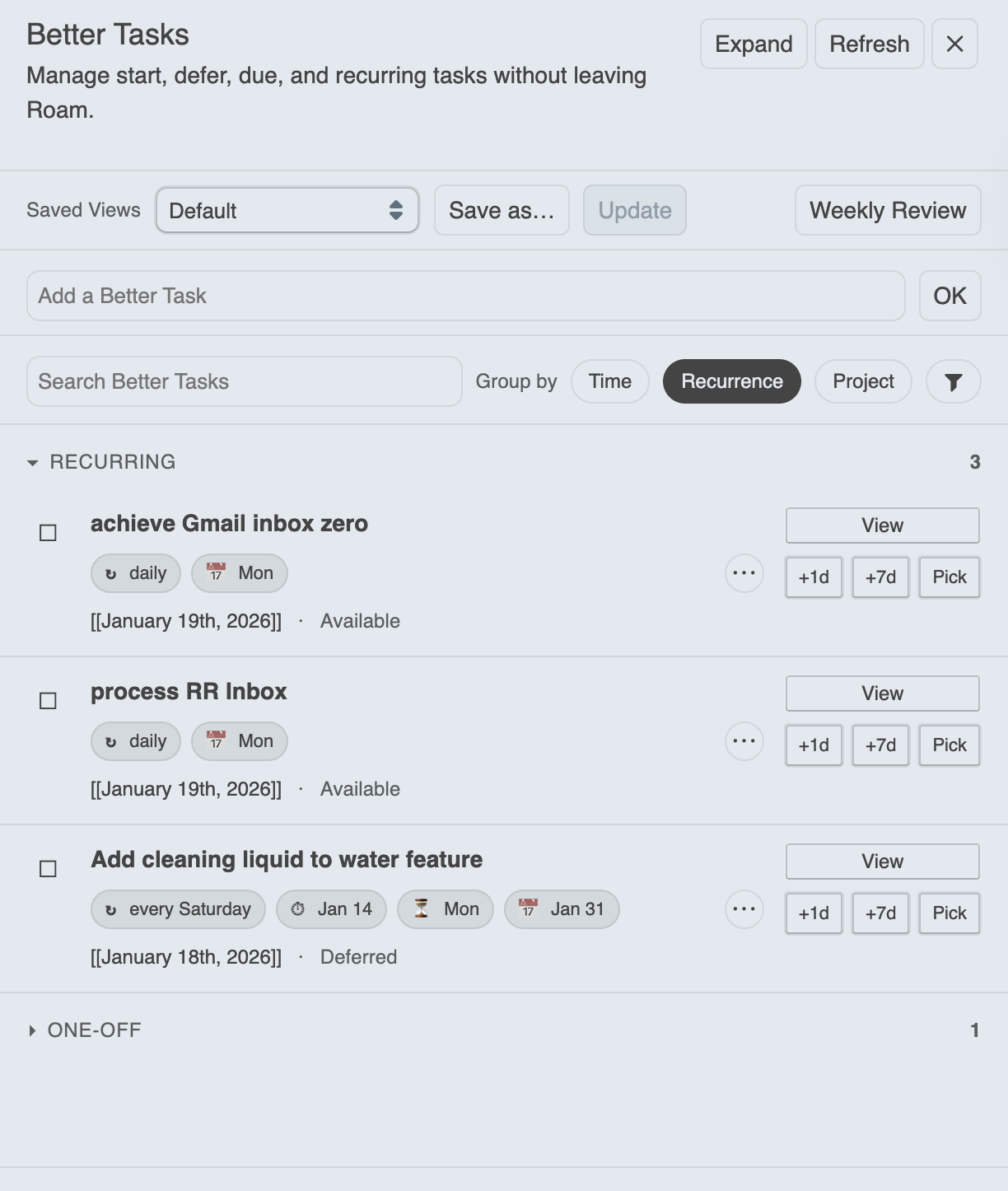
Features:
- Filters: recurrence, availability, due buckets, completion, blocked/actionable
- Quick snooze / complete actions
- Jump back to original blocks
- Draggable floating panel (position remembered)
- Optional full-page mode with persistent filter sidebar
- Metadata chips + filtering
- Quick-add input (local NLP parsing first, then AI if enabled) plus a Template button to instantiate saved templates
- Recurring series view (past completions, future projections, streak tracking, exceptions)
- Mobile-friendly layout (full-page with slide-in filters and sticky quick-add)
- Focus / Do Mode — distraction-free single-task execution surface with keyboard-first navigation, launched from the Focus button in the header (see Focus / Do Mode below)
- Graph Analytics — slide-in panel with completion trends, time-to-completion, overdue frequency, project breakdown, recurring adherence, and busiest-days heatmap (press
Shift+Gor click Analytics in the header) - Smart Suggestions — advisory nudges from local heuristics with per-suggestion Accept/Dismiss (press
Shift+Ior click Suggestions in the header; see Smart Suggestions below) - Keyboard navigation (press
?in the dashboard for the full legend):
| Key | Action |
|---|---|
j / k |
Move focus down / up |
Enter |
Open focused task |
c |
Complete / undo |
s / Shift+S |
Snooze +1d / +7d |
d |
Delete task (confirm dialog; bulk-aware) |
e |
Expand / collapse subtasks |
. |
Open task menu (navigate with j/k/arrows, Enter to select) |
x |
Toggle selection |
Shift+A |
Select all visible |
/ |
Focus search |
f |
Toggle full-page mode |
r |
Refresh |
? |
Show / hide shortcut legend |
Escape |
Close help → clear selection → clear focus |
Customise bindings via JSON in Settings → Advanced Dashboard → Keyboard bindings.
Preset views (seeded, in order):
- Next Actions
- Waiting For
- Completed (Last 7 Days)
- Upcoming (Next 7 Days)
- Overdue
- Someday / Maybe
- Blocked Tasks
- All Open Tasks
- Due Today
- Completed Yesterday
- Stalled Tasks
- Completed (Last 30 Days)
Reviews
The review menu (split button in the toolbar) offers four review types:
| Review | Steps |
|---|---|
| Daily | Due Today → Completed Yesterday → Overdue |
| Weekly | Next Actions → Waiting For → Completed 7d → Upcoming 7d → Overdue → Someday |
| Monthly | Completed 30d → Stalled → Someday → Overdue |
| Project Sweep | Select a project → Open → Overdue → Stalled → Completed 30d |
Each step can be independently enabled/disabled per review type in Settings → Advanced Dashboard.
Stalled tasks: open tasks whose block hasn’t been edited in N days (configurable, default 14). Available as a filter chip (Stalled/Active) in the sidebar and as a preset view.
Full-page mode
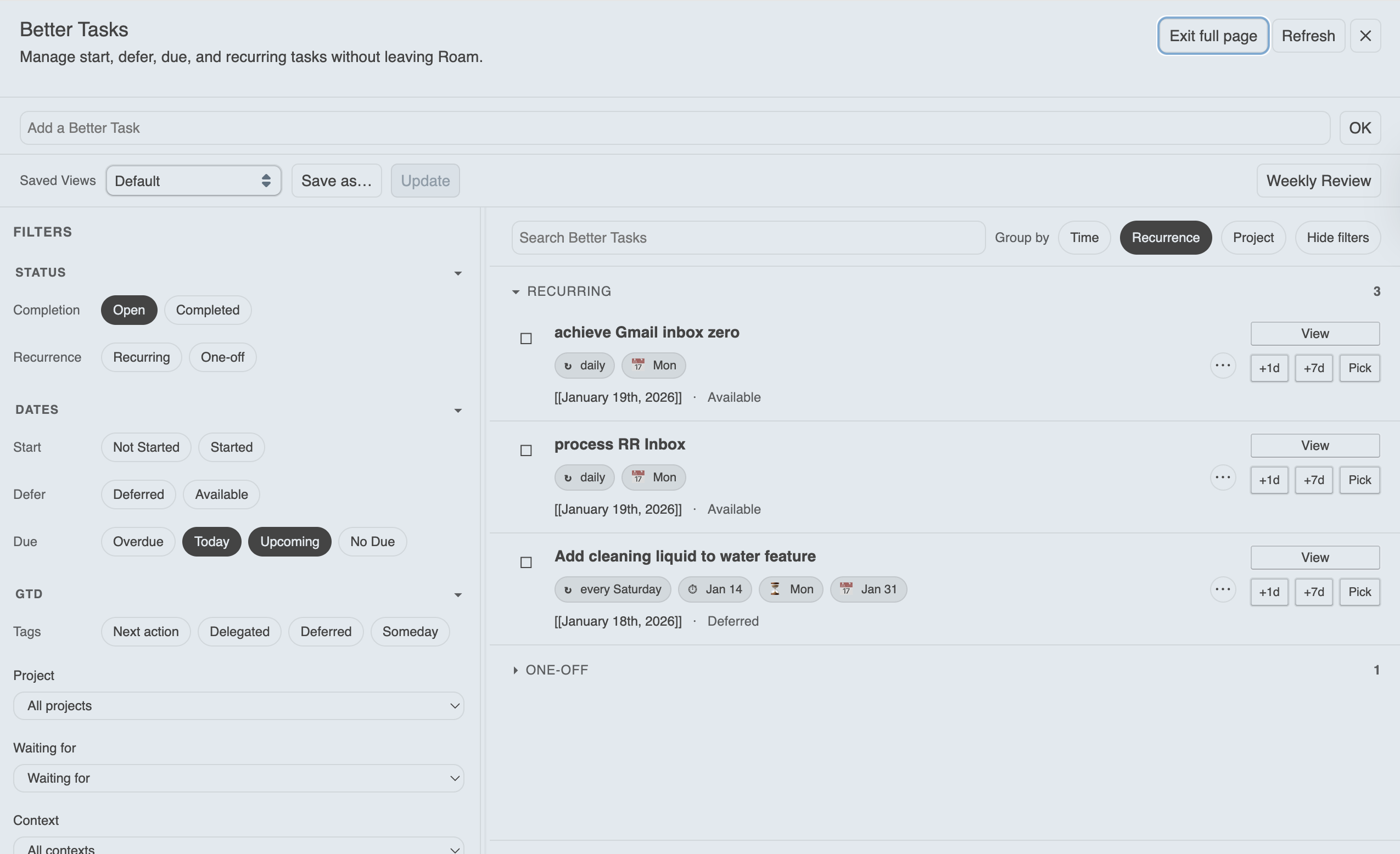
Mobile note:
- On small screens, the dashboard uses full-page layout by default
- Filters live in a slide-in drawer (tap Filters to open)
- Quick-add sticks to the bottom for easier reach
Bulk operations
Apply changes to multiple tasks at once from the dashboard.
Entering bulk mode:
- Click the Bulk button in the toolbar to enter selection mode
- Individual task action buttons hide to provide a focused selection experience
- In floating mode, grouping controls temporarily hide to save toolbar space
Selecting tasks:
- Click checkboxes to select individual tasks
- Shift+Click to select a range (click one task, then Shift+Click another to select all between)
- Use the group header checkbox to select or clear all tasks in that group
- Use Select All to select all visible tasks, or Clear to deselect
Available actions: | Action | Description | |——|————-| | Complete | Mark all selected tasks as done | | Reopen | Revert completed tasks to open | | Snooze +1d | Defer task 1 day | | Snooze +7d | Defer task 7 days | | Project | Set project from picklist | | Waiting For | Set waiting-for from picklist | | Context | Set context from picklist | | Priority | Set to low / medium / high / clear | | Energy | Set to low / medium / high / clear | | GTD | Set to Next Action / Delegated / Deferred / Someday / clear |
All bulk actions support Undo via the toast notification.
Tip: Set up your view first (filters, grouping) before entering bulk mode — this lets you target exactly the tasks you want to update.
Focus / Do Mode
A distraction-free, single-task execution surface launched from the Focus button in the dashboard header or via Command Palette → Better Tasks: Enter Focus Mode.
Focus Mode takes a snapshot of your currently-visible filtered and sorted task list at entry time, then guides you through one task at a time. The queue order stays stable for the whole session, but pills, blocked state, and subtask progress update live as you work.
Keyboard shortcuts (capture-phase, isolated from the dashboard):
| Key | Action |
|---|---|
j / n / → |
Next task |
k / p / ← |
Previous task |
c |
Complete current task (auto-advances) |
s |
Snooze +1 day |
Shift+S |
Snooze +7 days |
Enter |
Open task in Roam |
r |
Refresh task data (forces a snapshot pull) |
? |
Show / hide shortcut overlay |
Esc |
Exit Focus Mode |
Behaviour:
- Blocked tasks are shown with a 🔒 indicator and an amber hint;
cis disabled (toast) so you can’t accidentally complete a task whose dependencies aren’t met - Subtasks appear as a read-only checklist on the parent’s focus card and later in the queue as their own focus turns — every visible actionable task gets its own moment
- All done! celebration screen appears when the queue is cleared (every queued task is now complete)
- Stale-queue banner appears if any queued task’s title or blocked-state changes externally, or if a queued task is deleted — click Refresh queue to rebuild from the current filtered list
- Click outside the panel (or press
Esc) to exit; the dashboard returns to wherever you left it - The queue is in-memory only — Focus Mode closes on Roam reload (snapshot is intentionally ephemeral; rebuild it next time you open it)
Tip: set up your filter and sort first (e.g. “Due Today” preset, sorted by priority), then click Focus — the queue is built from exactly what you see.
Smart Suggestions
Advisory nudges computed locally from your task history — the extension never changes anything on its own. Open the panel from the Suggestions button in the dashboard header (with a live count badge) or press Shift+I.
| Rule | Fires when | Accept does |
|---|---|---|
| Snoozed task | a task has been snoozed 5+ times (threshold configurable) | moves it to Someday / Maybe |
| Weekday pattern | a recurring series is usually completed on one weekday (5+ completions, 60%+ concentration) but the open occurrence is due on another | reschedules the open occurrence to that weekday |
| Load balancing | a day in the coming week has 4+ tasks due while another day has none | moves one flexible task to the empty day nearest the pile-up |
| Stalled task | an open task hasn’t been edited for N days (default 14, shared with the Stalled filter) and has no near-term due date | moves it to Someday / Maybe |
| Recurring adherence | a series is completed on time 50% of the time or less (5+ dated completions) | opens the repeat-rule editor |
Behaviour:
- Advisory only — every suggestion has explicit Accept and Dismiss buttons; nothing is ever applied without a click
- Dismissals persist (stored in extension settings, synced across devices) — a dismissed or accepted suggestion stays hidden for 30 days, then may return if its trigger still holds
- Local heuristics only — no AI, no API calls, nothing leaves your graph
- The snoozed-task rule reads the activity log; if you’ve disabled the log, that rule stays silent and the panel says so in a footnote
- Accepted changes go through the normal attribute paths, so they land in the task’s activity log tagged as coming from a suggestion
- Master switch (on by default); per-rule toggles and the snooze threshold live under Advanced Dashboard options in settings
- Computed shortly after the dashboard opens and cached for 30 seconds — no background cost while the dashboard is closed
Also available programmatically via bt_get_suggestions in the Extension Tools API.
🗓 Today widget & Today badge (optional)
Today widget (on today’s DNP)
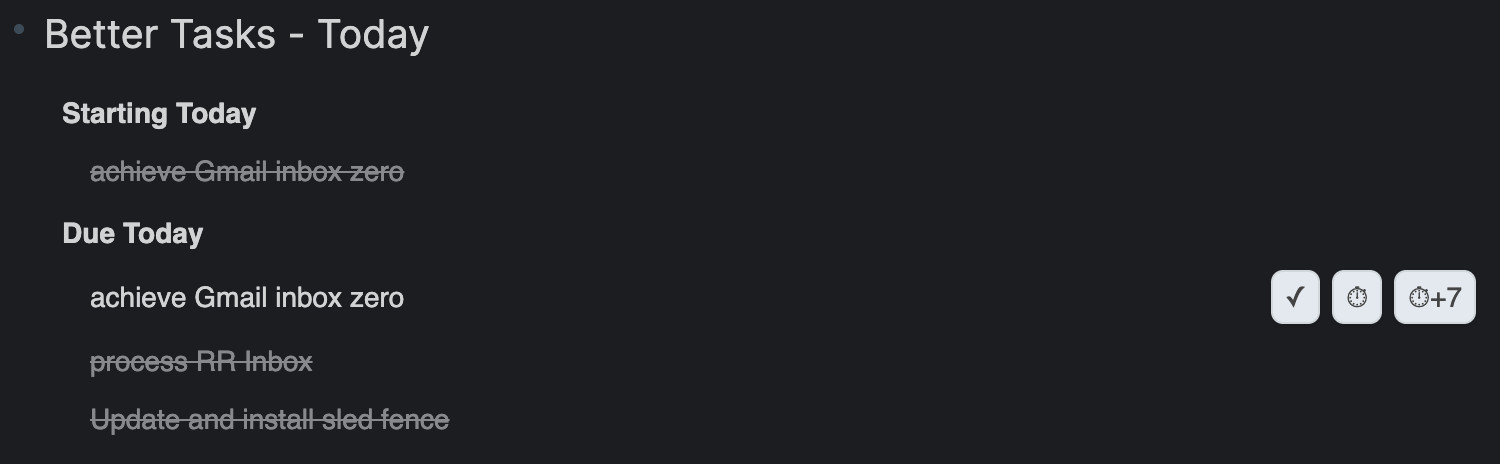
Shows tasks starting, deferred until, due, and (optionally) overdue today. Each task row has configurable action buttons:
| Button | Default | Description |
|---|---|---|
| ✓ Complete | On | Mark the task as done |
| ⏱ Snooze +1d | On | Snooze all dates forward 1 day |
| ⏱+7 Snooze +7d | On | Snooze all dates forward 7 days |
| (()) Copy Ref | Off | Copy the block reference ((uid)) to the clipboard |
| ⧉ Open Sidebar | Off | Open the task in the right sidebar |
Toggle each button on or off in the Today Widget settings. Clicking a task title navigates to the block; Shift+Click opens it in the sidebar.
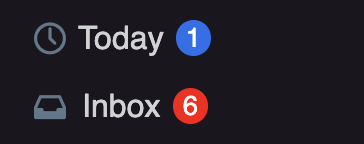
Today badge (left sidebar)
⚙️ Settings (progressive disclosure)
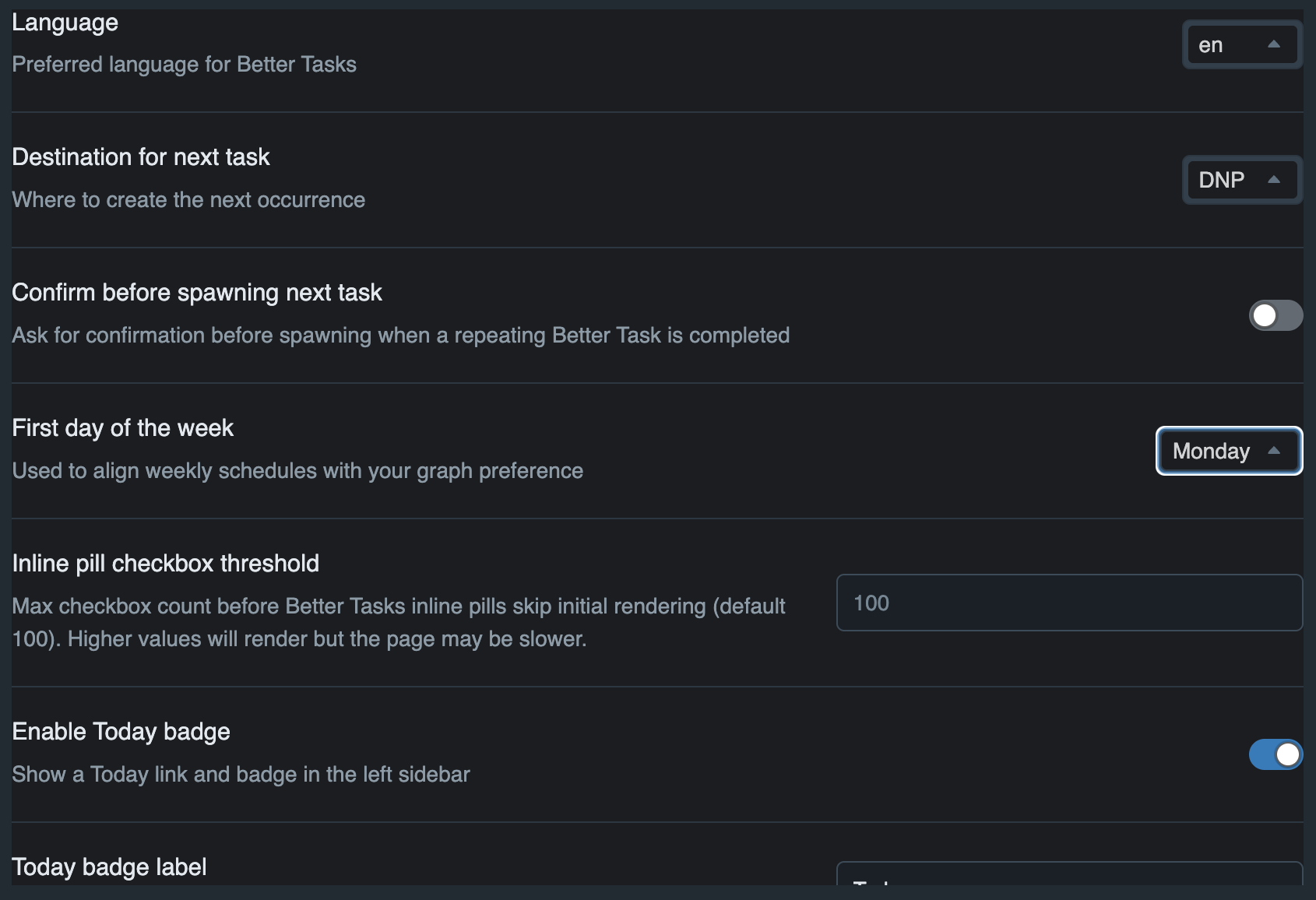
Core settings:
- Language
- Destination for next task (DNP, Same Page, DNP under heading, or Project Page)
- Confirm before spawning
- First day of week
- Inline pill checkbox threshold (performance guard)
- Inline pills in query results — render pills on every copy of a task (query results, embeds, linked references), not just the first on the page
- Write Project/Waiting/Context as page links — stores those values as
[[page links]]so native Roam queries find your tasks; creates pages and linked references for them task lists — render interactive result lists in blocks containing
Additional sections appear only when enabled.
- Today Badge — sidebar badge label, overdue inclusion, background and text colours.
- Today Widget — layout (panel or Roam-style inline), placement (top/bottom), heading level, overdue/completed inclusion, and per-button toggles (complete, snooze +1d, snooze +7d, copy ref, open sidebar).
- Advanced Dashboard options unlock the Weekly Review step toggles (on/off per step; order is fixed) and the per-rule Smart Suggestions toggles with the snooze threshold.
- Smart Suggestions — master enable/disable switch (on by default).
- Advanced Project/Context/Waiting options let you exclude specific pages from picklists.
- Customise attribute names (advanced) exposes settings to rename Better Tasks attribute labels/keys (including the notes attribute).
- Activity log settings: master enable/disable toggle, opt-in title-edit logging, optional maximum entries cap per task.
🧠 Smart task capture
Local parsing (no API key needed)
The quick-add input parses natural language locally using rule-based extraction. No network, no API key, works offline.
Syntax:
| Marker | Example | Writes attribute |
|——–|———|—————–|
| due: | due:friday, due:next week | BT_attrDue |
| start: | start:monday, start:in 3 days | BT_attrStart |
| defer: | defer:next month, defer:end of week | BT_attrDefer |
| ! | !high, !medium, !low | BT_attrPriority |
| ~ | ~high, ~medium, ~low | BT_attrEnergy |
| p: | p:ProjectName | BT_attrProject |
| @ | @office, @errands | BT_attrContext |
| Repeat keywords | every friday, daily, weekly | BT_attrRepeat |
| Trailing date | buy milk tomorrow | BT_attrDue (implicit) |
Supported date phrases (for due:, start:, defer:, or trailing):
- Named days:
monday,next tuesday,this friday - Relative:
today,tomorrow,next week,next month - Offsets:
in 3 days,in 2 weeks,5 days from now - Boundaries:
end of week,end of month,end of year - Fuzzy:
early next week,mid january,late this month - Roam dates:
[[April 15th, 2026]],2026-04-15
Examples:
buy milk due:friday→ title “buy milk”, due Fridaycall dentist tomorrow !high→ title “call dentist”, due tomorrow, priority highreview PR every week p:Engineering @office→ recurring task with project and contextsubmit report end of month→ title “submit report”, due last day of monthplan conference start:monday defer:next month→ start Monday, defer next monthsend invoice in 3 days→ title “send invoice”, due in 3 days
AI parsing (optional, experimental)
- Optional BYO OpenAI key (client-side only)
- Handles more ambiguous natural language than rule-based parsing
- Falls back safely if parsing fails
- No backend, no graph data sent
- Note: OpenAI keys are stored in Roam graph settings and may be included in some exports.
🧭 Commands
- Convert TODO to Better Task
- Create a Better Task
- Toggle Better Tasks Dashboard
- Toggle Dashboard (Full page)
- Switch / Save views
- Reinstall preset views
- Daily Review
- Weekly Review
- Monthly Review
- Enter Focus Mode
- Export Better Tasks (JSON)
- Export Better Tasks (CSV)
- Export Better Tasks (ICS Calendar)
- Create Better Task template
- Create from Better Task template
- Manage Better Task templates
- Save as Better Task template (block context menu)
- Deconvert Better Task to plain TODO
- Batch Deconvert All Better Tasks
📆 Repeat Field Syntax (Current Support)
The repeat:: attribute accepts natural-language patterns. Parsing is case-insensitive, tolerates extra whitespace, and supports separators like commas, /, &, and the word “and”.
Abbreviations and ranges are supported (e.g., Mon, Tue, Thu, MWF, TTh, Mon-Fri).
Anchor date: the next occurrence is calculated from due:: (preferred). If no due:: is present, the current date is used as the anchor.
Week start: ranges and some weekly rules respect your First day of the week setting in the extension.
Daily and Business Days
| Example | Meaning |
|—|—|
| every day | daily | once per day |
| every 2 days | every other day | every second day | every 2 days |
| every three days | every 3 days |
| every 5 days | every 5 days |
| every weekday | business days | workdays | Monday-Friday |
| every 2 weekdays | every 2 business days (Mon-Fri cadence) |
Weekly - Single Day (any case/abbrev)
| Example | Meaning |
|—|—|
| every monday | every week on Monday |
| every mon | EVERY MON | every MOnDaY | variants accepted |
Weekly - Base Keywords and Intervals
| Example | Meaning |
|—|—|
| weekly | every week | once per week (no fixed day) |
| every other week | every second week | biweekly | fortnightly | every fortnight | every 2 weeks |
| every 3 weeks | every third week (no fixed day) |
Weekly - Multiple Days (lists and separators)
| Example | Meaning |
|—|—|
| weekly on tue, thu | Tuesday and Thursday |
| weekly on tue thu | same (spaces only) |
| weekly on tue & thu | same (& supported) |
| weekly on tue/thu | Tu/Th | t/th | slash shorthand |
| every mon, wed, fri | MWF | Monday, Wednesday, Friday |
| TTh | Tuesday and Thursday |
| weekly on tue, thu and sat & sun | mixed separators supported |
Weekly - Ranges (includes wrap-around)
| Example | Meaning |
|—|—|
| every mon-fri | Monday through Friday |
| every fri-sun | Friday to Sunday range |
| every su-tu | Sunday to Tuesday (wrap) |
Weekly - Interval + Specific Day(s)
| Example | Meaning |
|—|—|
| every 2 weeks on monday | every 2nd Monday |
| every 3 weeks on fri | every 3rd Friday |
| every 4 weeks on tue, thu | every 4th week on Tue & Thu |
| every other tuesday | every second tuesday | every 2nd Tuesday (fortnightly) |
Monthly - By Day Number (single/multi, clamps, EOM)
| Example | Meaning |
|—|—|
| monthly | same calendar day each month (uses due:: day) |
| every month on day 15 | 15th of each month |
| the 1st day of each month | 1st day every month |
| day 31 of each month | clamps to end of shorter months |
| last day of the month | last day of each month | last day of every month | EOM | last calendar day each month |
| on the 1st and 15th of each month | 1st and 15th |
| on the 15th and last day of each month | 15th + EOM |
| on the 5th, 12th, 20th of each month | on the 5th/12th/20th of each month | on the 5th & 12th & 20th of each month | multiple specific dates |
Monthly - Nth Weekday Variants
first monday of each month2nd wed every monthlast friday of each month1st and 3rd monday of each monthpenultimate friday of each month/second last friday ...first weekday of each monthlast weekday of each monthevery month on the second tuesday2nd Tue each monththe last thu each month
Every N Months (date or Nth weekday)
every 2 months on the 10thevery 3 months on the 2nd tuesdayquarterlysemiannual/semi-annually/twice a year
Yearly - Fixed Date and Nth Weekday-in-Month
every March 10,on 10 March every yearannually,yearly(fixed-date anchor)first Monday of May every yearfirst monday of september(the trailingevery yearis optional)
Weekends
| Example | Meaning |
|—|—|
| every weekend | weekends | Saturday & Sunday |
Notes:
- Abbreviations and aliases:
Mon/Mon./Monday,Thu/Thurs/Thursday,MWF,TThare accepted. - Ranges:
Mon-Friexpands to all included days. - Clamping: day numbers beyond a month’s end clamp to the last valid date (e.g.,
31st-> Feb 28/29). - “Every N weekdays” counts business days (Mon-Fri) only.
- Pluralisation is flexible:
monday/mondays,week/weeks, etc.
🔍 Querying Better Tasks
Tasks are native Roam blocks with [[page ref]] metadata, so every Roam
query surface can see them — plus a dedicated component for the common case:
Type that in any block and Better Tasks mounts a live task list: native
checkboxes (recurring tasks spawn their next occurrence on completion),
inline pills, a result count and a refresh button. Filters: status,
project, due, completed, blocked, assignee, query (free text),
limit, sort — the same vocabulary as the bt_search API.
More examples:
Native `` and Datalog work too — project, waiting-for and context
values are written as [[page links]], so
}
finds tasks with zero extension involvement.
📖 Full guide with copy-paste Datalog snippets (overdue, due this week, by project, waiting-for, stalled): docs/query-cookbook.md
⚡ Performance notes
Recent versions include memory and render optimisations.
If Roam feels slow:
- Disable Today Widget
- Disable Today Badge
- Message me in Slack with task count + details
🌍 Internationalisation
Supported:
- English (en)
- Simplified Chinese (zh)
- Traditional Chinese (zhHant)
- Spanish (es)
- German (de)
- French (fr)
- Japanese (ja)
- Russian (ru)
- Korean (ko)
- Portuguese, Portugal (pt-PT)
- Portuguese, Brazil (pt-BR)
- Arabic (ar)
- Italian (it)
UI is fully locale-aware.
Natural-language recurrence parsing is intentionally English-only for now.
Extension Tools API
Better Tasks registers tools on window.RoamExtensionTools["better-tasks"] so other extensions (e.g. Chief of Staff) can query and manage tasks programmatically.
Available tools
| Tool | Description |
|---|---|
bt_get_projects |
List projects with derived status and optional task counts |
bt_get_waiting_for |
List waiting-for values with optional counts |
bt_get_context |
List context values with optional counts |
bt_get_attributes |
Get configured attribute schema — all 14 attributes with names, types, aliases, and allowed values |
bt_search |
Search tasks by status, due, project, assignee, blocked state, or free text. Results include is_subtask, parent_task_uid, subtask_uids, subtask_progress. |
bt_create |
Create a new task (defaults to today’s daily page). Supports all attributes including parent and depends. |
bt_modify |
Update an existing task’s status, text, or attributes |
bt_bulk_modify |
Modify multiple tasks in a single operation (max 50) |
bt_bulk_snooze |
Snooze multiple tasks by shifting defer/start/due dates forward |
bt_delete |
Permanently delete a task and its entire subtree; cleans dependency/parent references first. Requires confirm: true. |
bt_bulk_delete |
Delete multiple tasks in one operation (max 50). Requires confirm: true. |
bt_get_analytics |
Task analytics: overdue count, completion rate, velocity by project and time period |
bt_get_analytics_detailed |
Full analytics: summary, completion over time, time-to-completion distribution, overdue frequency, project breakdown, recurring adherence, busiest-days heatmap |
bt_get_suggestions |
Advisory suggestions from local heuristics: snooze counts, weekday patterns, load balancing, stalled tasks, recurring adherence. Read-only. |
bt_get_task_by_uid |
Fetch a single task by its block UID with full details |
bt_export |
Export tasks as JSON, CSV, or ICS with optional status/project filters (returns data, no browser download) |
bt_list_templates |
List saved task templates with their parameters |
bt_create_from_template |
Create a task from a saved template; resolves parameters and creates subtasks |
bt_manage_templates |
Create, update, delete, or duplicate templates programmatically |
bt_search blocked filter values
| Value | Meaning |
|---|---|
blocked |
Only tasks blocked by incomplete dependencies |
actionable |
Only tasks not blocked (no deps or all deps complete) |
bt_search due filter values
| Value | Meaning |
|---|---|
overdue |
TODO tasks past their due date |
today |
Tasks due today |
this-week |
Tasks due after today through 7 days from now (use today for today’s tasks) |
upcoming |
Tasks due in the future (not overdue or today) |
none |
Tasks with no due date |
ISO date (e.g. 2026-02-20) |
Tasks due on that specific date |
Project status derivation
bt_get_projects derives status from task counts rather than a stored field:
- active — has at least one TODO task, or has no tasks at all
- completed — has tasks and all are DONE
Enjoy Better Task management directly inside Roam Research!